Anchoring
Anchoring decides where the box sits and what it tracks. It is separate from the template on purpose: a classic panel can follow an NPC, and a speech bubble can pin to a screen corner.
Placement lives on the conversation, with an optional line exception, not in the box style. follow_offset_3d depends on the target and moment—a dwarf and a dragon can share a colour scheme without sharing an anchor.
In the TalkKit workspace, the conversation's Defaults row has a placement menu: Use dialogue box placement, Screen placement or Follow target. Advanced placement properties… opens the visual Placement editor, where the mode is Screen or Follow node. Screen mode shows the 3×3 position map; Follow node shows target, offset, pivot and offscreen behavior. A single line gets its own placement from Customize placement in its detail pane. 3D distance and occlusion stay under Advanced 3D.
Leave it empty
The built-in box ships a sensible default: it pins to the bottom of the screen, the bubble follows the conversation target. Most NPCs never need an anchor at all.
Screen
extends Node

## Docs: /guide/anchoring — where the box sits and what it tracks.

var _camera: Camera3D
var _villager: Node3D


func _ready() -> void:
	_build()


#region screen
# Pinned to the viewport. The Classic Panel ships with this, but any box can
# use it — placement is not decided by the template you picked.
func pin_to_the_bottom() -> void:
	var anchor := TalkAnchor.new()
	anchor.mode = TalkAnchor.Mode.SCREEN
	anchor.screen_spot = TalkAnchor.Spot.BOTTOM
	anchor.screen_margin = Vector2(32.0, 32.0)
	anchor.stretch_horizontal = true
	$NPCTalkKit.quick_say_placement = anchor
#endregion


#region follow-2d
# Tracks a node. `pivot` says which part of the box lands on the target:
# (0.5, 1) puts it above, (0.5, 0) below, (1, 0.5) to its left.
func float_above_the_npc(npc: Node2D) -> void:
	var anchor := TalkAnchor.new()
	anchor.mode = TalkAnchor.Mode.NODE_FOLLOW
	anchor.follow_offset = Vector2(0.0, -96.0)
	anchor.pivot = Vector2(0.5, 1.0)
	anchor.when_offscreen = TalkAnchor.Offscreen.CLAMP
	$NPCTalkKit.quick_say_placement = anchor
	$NPCTalkKit.conversation_target = npc
#endregion


#region follow-3d
# Two offsets, and the difference matters. follow_offset_3d is world space and
# is applied before projection, so it stays on the character's head as the
# camera moves. follow_offset is a screen-space nudge applied afterwards.
func float_above_a_3d_character(character: Node3D) -> void:
	var anchor := TalkAnchor.new()
	anchor.mode = TalkAnchor.Mode.NODE_FOLLOW
	anchor.follow_offset_3d = Vector3(0.0, 1.9, 0.0)   # head height, in metres
	anchor.follow_offset = Vector2(0.0, -12.0)         # a few pixels of air
	anchor.max_distance = 30.0                         # hide beyond this
	anchor.when_offscreen = TalkAnchor.Offscreen.HIDE
	$NPCTalkKit.quick_say_placement = anchor
	$NPCTalkKit.conversation_target = character
#endregion


#region distance
# Off by default: a constant on-screen size keeps text readable at any range.
# Turn it on when the box should feel part of the world.
func shrink_with_distance(anchor: TalkAnchor) -> void:
	anchor.scale_with_distance = true
	anchor.reference_distance = 8.0
	anchor.min_scale = 0.6
	anchor.max_scale = 1.4
#endregion


func _build() -> void:
	var box := _instant_box()
	var talk := NPCTalkKit.new()
	talk.name = "NPCTalkKit"
	talk.dialogue_boxes = [box]
	add_child(talk)

	_camera = Camera3D.new()
	_camera.position = Vector3(0.0, 0.0, 10.0)
	add_child(_camera)
	_camera.make_current()

	_villager = Node3D.new()
	add_child(_villager)


func _verify() -> Array[String]:
	var failures: Array[String] = []
	var box := Vector2(400.0, 100.0)
	var talk: NPCTalkKit = $NPCTalkKit

	pin_to_the_bottom()
	var screen := talk.quick_say_placement.resolve(self, box)
	var view := get_viewport().get_visible_rect().size
	if not screen.visible or not is_equal_approx(screen.position.y, view.y - 100.0 - 32.0):
		failures.append("anchoring: the screen anchor did not sit on the bottom margin")

	float_above_a_3d_character(_villager)
	var tracked := talk.quick_say_placement.resolve(self, box, _villager)
	if not tracked.visible:
		failures.append("anchoring: a character in front of the camera must be visible")

	# Behind the camera must hide, not mirror across the screen.
	_villager.position = Vector3(0.0, 0.0, 40.0)
	if talk.quick_say_placement.resolve(self, box, _villager).visible:
		failures.append("anchoring: a target behind the camera must be hidden")
	_villager.position = Vector3.ZERO

	# Past max_distance must hide.
	_camera.position = Vector3(0.0, 0.0, 100.0)
	if talk.quick_say_placement.resolve(self, box, _villager).visible:
		failures.append("anchoring: max_distance did not hide the box")
	_camera.position = Vector3(0.0, 0.0, 10.0)

	shrink_with_distance(talk.quick_say_placement)
	var scaled := talk.quick_say_placement.resolve(self, box, _villager)
	if is_equal_approx(scaled.scale, 1.0):
		failures.append("anchoring: distance scaling had no effect")
	return failures


## Typing speed lives on the dialogue box now, so turning it off for a scripted
## run means handing the node a box that types instantly.
func _instant_box() -> TalkBoxTemplate:
	var template := TalkBoxTemplate.new()
	template.typewriter_speed = 0.0
return template| Field | Meaning |
|---|---|
screen_spot | nine positions — corners, edges, centre — or ABSOLUTE |
screen_margin | distance from the edge |
screen_position | used when screen_spot is ABSOLUTE |
stretch_horizontal | fill the viewport width minus the margin |
box_size | the least size; zero keeps the natural one |
The box always fits the screen. A forced size is a floor: a line that needs more room grows the box rather than overflowing it. With no width set, text wraps at about 440 px, never wider than the screen; a long speaker name is trimmed before the box would leave it. Ornaments, a name on the top edge and a tail count as part of the box, so they stay on screen too.
Following a node
extends Node

## Docs: /guide/anchoring — where the box sits and what it tracks.

var _camera: Camera3D
var _villager: Node3D


func _ready() -> void:
	_build()


#region screen
# Pinned to the viewport. The Classic Panel ships with this, but any box can
# use it — placement is not decided by the template you picked.
func pin_to_the_bottom() -> void:
	var anchor := TalkAnchor.new()
	anchor.mode = TalkAnchor.Mode.SCREEN
	anchor.screen_spot = TalkAnchor.Spot.BOTTOM
	anchor.screen_margin = Vector2(32.0, 32.0)
	anchor.stretch_horizontal = true
	$NPCTalkKit.quick_say_placement = anchor
#endregion


#region follow-2d
# Tracks a node. `pivot` says which part of the box lands on the target:
# (0.5, 1) puts it above, (0.5, 0) below, (1, 0.5) to its left.
func float_above_the_npc(npc: Node2D) -> void:
	var anchor := TalkAnchor.new()
	anchor.mode = TalkAnchor.Mode.NODE_FOLLOW
	anchor.follow_offset = Vector2(0.0, -96.0)
	anchor.pivot = Vector2(0.5, 1.0)
	anchor.when_offscreen = TalkAnchor.Offscreen.CLAMP
	$NPCTalkKit.quick_say_placement = anchor
	$NPCTalkKit.conversation_target = npc
#endregion


#region follow-3d
# Two offsets, and the difference matters. follow_offset_3d is world space and
# is applied before projection, so it stays on the character's head as the
# camera moves. follow_offset is a screen-space nudge applied afterwards.
func float_above_a_3d_character(character: Node3D) -> void:
	var anchor := TalkAnchor.new()
	anchor.mode = TalkAnchor.Mode.NODE_FOLLOW
	anchor.follow_offset_3d = Vector3(0.0, 1.9, 0.0)   # head height, in metres
	anchor.follow_offset = Vector2(0.0, -12.0)         # a few pixels of air
	anchor.max_distance = 30.0                         # hide beyond this
	anchor.when_offscreen = TalkAnchor.Offscreen.HIDE
	$NPCTalkKit.quick_say_placement = anchor
	$NPCTalkKit.conversation_target = character
#endregion


#region distance
# Off by default: a constant on-screen size keeps text readable at any range.
# Turn it on when the box should feel part of the world.
func shrink_with_distance(anchor: TalkAnchor) -> void:
	anchor.scale_with_distance = true
	anchor.reference_distance = 8.0
	anchor.min_scale = 0.6
	anchor.max_scale = 1.4
#endregion


func _build() -> void:
	var box := _instant_box()
	var talk := NPCTalkKit.new()
	talk.name = "NPCTalkKit"
	talk.dialogue_boxes = [box]
	add_child(talk)

	_camera = Camera3D.new()
	_camera.position = Vector3(0.0, 0.0, 10.0)
	add_child(_camera)
	_camera.make_current()

	_villager = Node3D.new()
	add_child(_villager)


func _verify() -> Array[String]:
	var failures: Array[String] = []
	var box := Vector2(400.0, 100.0)
	var talk: NPCTalkKit = $NPCTalkKit

	pin_to_the_bottom()
	var screen := talk.quick_say_placement.resolve(self, box)
	var view := get_viewport().get_visible_rect().size
	if not screen.visible or not is_equal_approx(screen.position.y, view.y - 100.0 - 32.0):
		failures.append("anchoring: the screen anchor did not sit on the bottom margin")

	float_above_a_3d_character(_villager)
	var tracked := talk.quick_say_placement.resolve(self, box, _villager)
	if not tracked.visible:
		failures.append("anchoring: a character in front of the camera must be visible")

	# Behind the camera must hide, not mirror across the screen.
	_villager.position = Vector3(0.0, 0.0, 40.0)
	if talk.quick_say_placement.resolve(self, box, _villager).visible:
		failures.append("anchoring: a target behind the camera must be hidden")
	_villager.position = Vector3.ZERO

	# Past max_distance must hide.
	_camera.position = Vector3(0.0, 0.0, 100.0)
	if talk.quick_say_placement.resolve(self, box, _villager).visible:
		failures.append("anchoring: max_distance did not hide the box")
	_camera.position = Vector3(0.0, 0.0, 10.0)

	shrink_with_distance(talk.quick_say_placement)
	var scaled := talk.quick_say_placement.resolve(self, box, _villager)
	if is_equal_approx(scaled.scale, 1.0):
		failures.append("anchoring: distance scaling had no effect")
	return failures


## Typing speed lives on the dialogue box now, so turning it off for a scripted
## run means handing the node a box that types instantly.
func _instant_box() -> TalkBoxTemplate:
	var template := TalkBoxTemplate.new()
	template.typewriter_speed = 0.0
	return template
pivot is the field that replaces "above / below / left / right": it says which part of the box lands on the target.
pivot | Result |
|---|---|
(0.5, 1) | above the target |
(0.5, 0) | below it |
(1, 0.5) | to its left |
(0, 0.5) | to its right |
when_offscreen decides what happens when the target leaves the view: CLAMP keeps the box on screen, HIDE hides it (and keeps it on screen while the target is in view), FREE lets it travel. When the screen edge would push a box over its speaker, it moves to the other side of them and the tail turns to follow.
follow_target is resolved relative to the NPCTalkKit node, so a shared anchor still works across NPCs built the same way. Leave it empty and the conversation target is used.
3D
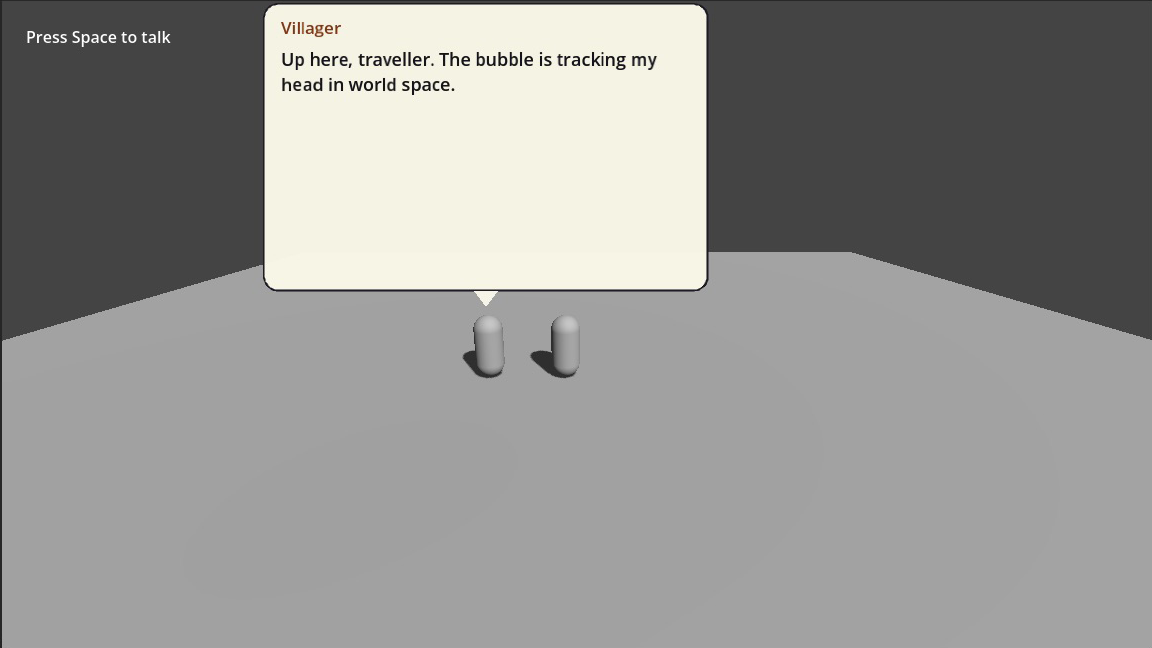
Everything above applies; a Node3D target is projected through the active Camera3D.
extends Node

## Docs: /guide/anchoring — where the box sits and what it tracks.

var _camera: Camera3D
var _villager: Node3D


func _ready() -> void:
	_build()


#region screen
# Pinned to the viewport. The Classic Panel ships with this, but any box can
# use it — placement is not decided by the template you picked.
func pin_to_the_bottom() -> void:
	var anchor := TalkAnchor.new()
	anchor.mode = TalkAnchor.Mode.SCREEN
	anchor.screen_spot = TalkAnchor.Spot.BOTTOM
	anchor.screen_margin = Vector2(32.0, 32.0)
	anchor.stretch_horizontal = true
	$NPCTalkKit.quick_say_placement = anchor
#endregion


#region follow-2d
# Tracks a node. `pivot` says which part of the box lands on the target:
# (0.5, 1) puts it above, (0.5, 0) below, (1, 0.5) to its left.
func float_above_the_npc(npc: Node2D) -> void:
	var anchor := TalkAnchor.new()
	anchor.mode = TalkAnchor.Mode.NODE_FOLLOW
	anchor.follow_offset = Vector2(0.0, -96.0)
	anchor.pivot = Vector2(0.5, 1.0)
	anchor.when_offscreen = TalkAnchor.Offscreen.CLAMP
	$NPCTalkKit.quick_say_placement = anchor
	$NPCTalkKit.conversation_target = npc
#endregion


#region follow-3d
# Two offsets, and the difference matters. follow_offset_3d is world space and
# is applied before projection, so it stays on the character's head as the
# camera moves. follow_offset is a screen-space nudge applied afterwards.
func float_above_a_3d_character(character: Node3D) -> void:
	var anchor := TalkAnchor.new()
	anchor.mode = TalkAnchor.Mode.NODE_FOLLOW
	anchor.follow_offset_3d = Vector3(0.0, 1.9, 0.0)   # head height, in metres
	anchor.follow_offset = Vector2(0.0, -12.0)         # a few pixels of air
	anchor.max_distance = 30.0                         # hide beyond this
	anchor.when_offscreen = TalkAnchor.Offscreen.HIDE
	$NPCTalkKit.quick_say_placement = anchor
	$NPCTalkKit.conversation_target = character
#endregion


#region distance
# Off by default: a constant on-screen size keeps text readable at any range.
# Turn it on when the box should feel part of the world.
func shrink_with_distance(anchor: TalkAnchor) -> void:
	anchor.scale_with_distance = true
	anchor.reference_distance = 8.0
	anchor.min_scale = 0.6
	anchor.max_scale = 1.4
#endregion


func _build() -> void:
	var box := _instant_box()
	var talk := NPCTalkKit.new()
	talk.name = "NPCTalkKit"
	talk.dialogue_boxes = [box]
	add_child(talk)

	_camera = Camera3D.new()
	_camera.position = Vector3(0.0, 0.0, 10.0)
	add_child(_camera)
	_camera.make_current()

	_villager = Node3D.new()
	add_child(_villager)


func _verify() -> Array[String]:
	var failures: Array[String] = []
	var box := Vector2(400.0, 100.0)
	var talk: NPCTalkKit = $NPCTalkKit

	pin_to_the_bottom()
	var screen := talk.quick_say_placement.resolve(self, box)
	var view := get_viewport().get_visible_rect().size
	if not screen.visible or not is_equal_approx(screen.position.y, view.y - 100.0 - 32.0):
		failures.append("anchoring: the screen anchor did not sit on the bottom margin")

	float_above_a_3d_character(_villager)
	var tracked := talk.quick_say_placement.resolve(self, box, _villager)
	if not tracked.visible:
		failures.append("anchoring: a character in front of the camera must be visible")

	# Behind the camera must hide, not mirror across the screen.
	_villager.position = Vector3(0.0, 0.0, 40.0)
	if talk.quick_say_placement.resolve(self, box, _villager).visible:
		failures.append("anchoring: a target behind the camera must be hidden")
	_villager.position = Vector3.ZERO

	# Past max_distance must hide.
	_camera.position = Vector3(0.0, 0.0, 100.0)
	if talk.quick_say_placement.resolve(self, box, _villager).visible:
		failures.append("anchoring: max_distance did not hide the box")
	_camera.position = Vector3(0.0, 0.0, 10.0)

	shrink_with_distance(talk.quick_say_placement)
	var scaled := talk.quick_say_placement.resolve(self, box, _villager)
	if is_equal_approx(scaled.scale, 1.0):
		failures.append("anchoring: distance scaling had no effect")
	return failures


## Typing speed lives on the dialogue box now, so turning it off for a scripted
## run means handing the node a box that types instantly.
func _instant_box() -> TalkBoxTemplate:
	var template := TalkBoxTemplate.new()
	template.typewriter_speed = 0.0
	return template
Four things 2D does not have to think about, all handled:
- Behind the camera. Unprojection mirrors points behind the camera, which would fling the box to the opposite side of the screen. Those are hidden instead.
- Two offsets, not one.
follow_offset_3dis world space and applied before projection, so it stays on the character's head as the camera moves.follow_offsetis a screen-space nudge applied after. A screen offset alone drifts off the head as the camera approaches. - Distance.
max_distancehides the box beyond a range. - Occlusion.
hide_when_occludedraycasts from the camera, so a character behind a wall does not float a bubble through it. Off by default — it is the only per-frame cost in this resource, and it runs in the physics frame.
Size at distance
extends Node

## Docs: /guide/anchoring — where the box sits and what it tracks.

var _camera: Camera3D
var _villager: Node3D


func _ready() -> void:
	_build()


#region screen
# Pinned to the viewport. The Classic Panel ships with this, but any box can
# use it — placement is not decided by the template you picked.
func pin_to_the_bottom() -> void:
	var anchor := TalkAnchor.new()
	anchor.mode = TalkAnchor.Mode.SCREEN
	anchor.screen_spot = TalkAnchor.Spot.BOTTOM
	anchor.screen_margin = Vector2(32.0, 32.0)
	anchor.stretch_horizontal = true
	$NPCTalkKit.quick_say_placement = anchor
#endregion


#region follow-2d
# Tracks a node. `pivot` says which part of the box lands on the target:
# (0.5, 1) puts it above, (0.5, 0) below, (1, 0.5) to its left.
func float_above_the_npc(npc: Node2D) -> void:
	var anchor := TalkAnchor.new()
	anchor.mode = TalkAnchor.Mode.NODE_FOLLOW
	anchor.follow_offset = Vector2(0.0, -96.0)
	anchor.pivot = Vector2(0.5, 1.0)
	anchor.when_offscreen = TalkAnchor.Offscreen.CLAMP
	$NPCTalkKit.quick_say_placement = anchor
	$NPCTalkKit.conversation_target = npc
#endregion


#region follow-3d
# Two offsets, and the difference matters. follow_offset_3d is world space and
# is applied before projection, so it stays on the character's head as the
# camera moves. follow_offset is a screen-space nudge applied afterwards.
func float_above_a_3d_character(character: Node3D) -> void:
	var anchor := TalkAnchor.new()
	anchor.mode = TalkAnchor.Mode.NODE_FOLLOW
	anchor.follow_offset_3d = Vector3(0.0, 1.9, 0.0)   # head height, in metres
	anchor.follow_offset = Vector2(0.0, -12.0)         # a few pixels of air
	anchor.max_distance = 30.0                         # hide beyond this
	anchor.when_offscreen = TalkAnchor.Offscreen.HIDE
	$NPCTalkKit.quick_say_placement = anchor
	$NPCTalkKit.conversation_target = character
#endregion


#region distance
# Off by default: a constant on-screen size keeps text readable at any range.
# Turn it on when the box should feel part of the world.
func shrink_with_distance(anchor: TalkAnchor) -> void:
	anchor.scale_with_distance = true
	anchor.reference_distance = 8.0
	anchor.min_scale = 0.6
	anchor.max_scale = 1.4
#endregion


func _build() -> void:
	var box := _instant_box()
	var talk := NPCTalkKit.new()
	talk.name = "NPCTalkKit"
	talk.dialogue_boxes = [box]
	add_child(talk)

	_camera = Camera3D.new()
	_camera.position = Vector3(0.0, 0.0, 10.0)
	add_child(_camera)
	_camera.make_current()

	_villager = Node3D.new()
	add_child(_villager)


func _verify() -> Array[String]:
	var failures: Array[String] = []
	var box := Vector2(400.0, 100.0)
	var talk: NPCTalkKit = $NPCTalkKit

	pin_to_the_bottom()
	var screen := talk.quick_say_placement.resolve(self, box)
	var view := get_viewport().get_visible_rect().size
	if not screen.visible or not is_equal_approx(screen.position.y, view.y - 100.0 - 32.0):
		failures.append("anchoring: the screen anchor did not sit on the bottom margin")

	float_above_a_3d_character(_villager)
	var tracked := talk.quick_say_placement.resolve(self, box, _villager)
	if not tracked.visible:
		failures.append("anchoring: a character in front of the camera must be visible")

	# Behind the camera must hide, not mirror across the screen.
	_villager.position = Vector3(0.0, 0.0, 40.0)
	if talk.quick_say_placement.resolve(self, box, _villager).visible:
		failures.append("anchoring: a target behind the camera must be hidden")
	_villager.position = Vector3.ZERO

	# Past max_distance must hide.
	_camera.position = Vector3(0.0, 0.0, 100.0)
	if talk.quick_say_placement.resolve(self, box, _villager).visible:
		failures.append("anchoring: max_distance did not hide the box")
	_camera.position = Vector3(0.0, 0.0, 10.0)

	shrink_with_distance(talk.quick_say_placement)
	var scaled := talk.quick_say_placement.resolve(self, box, _villager)
	if is_equal_approx(scaled.scale, 1.0):
		failures.append("anchoring: distance scaling had no effect")
	return failures


## Typing speed lives on the dialogue box now, so turning it off for a scripted
## run means handing the node a box that types instantly.
func _instant_box() -> TalkBoxTemplate:
	var template := TalkBoxTemplate.new()
	template.typewriter_speed = 0.0
	return template
Off by default: a constant on-screen size keeps text readable at any range.
Why it stays on a CanvasLayer
The box is UI, not geometry. Parenting it to the character would scale the text with camera zoom, which is almost never what you want.
A fixed point, with no node
There is no separate "world position" mode, on purpose. Drop a Marker2D or Marker3D where the sign or the shrine stands and follow that.
Typing world coordinates into a resource means guessing where (400, 300) is. Dragging a marker in the viewport means seeing it — and the result is identical, at the cost of one node.
Something else entirely
Subclass TalkAnchor and override resolve(). Every built-in mode goes through that same method, so a skeleton socket or a custom position provider plugs in without touching the addon.