Anchoring
Anchor quyết định hộp nằm ở đâu và bám vào cái gì. Nó tách khỏi template một cách có chủ ý: hộp đáy vẫn bám được NPC, và bong bóng vẫn ghim được vào góc màn hình.
Vị trí nằm trên conversation, với ngoại lệ trên line khi cần, chứ không nằm trong style của hộp. follow_offset_3d phụ thuộc mục tiêu và tình huống—lão lùn và con rồng vẫn dùng chung bảng màu mà không cần dùng chung anchor.
Trong workspace TalkKit, hàng Defaults của conversation có menu placement: Use dialogue box placement, Screen placement hoặc Follow target. Advanced placement properties… mở Placement editor trực quan, nơi chọn chế độ Screen hoặc Follow node. Screen có bản đồ 3×3; Follow node hiện target, offset, pivot và cách xử lý khi ra ngoài màn hình. Riêng một line thì lấy placement của nó qua Customize placement trong pane detail. Khoảng cách và occlusion 3D nằm dưới Advanced 3D.
Cứ để trống
Hộp có sẵn đã có mặc định hợp lý: ghim xuống đáy màn hình. Phần lớn NPC không cần anchor nào cả.
Màn hình
extends Node

## Docs: /guide/anchoring — where the box sits and what it tracks.

var _camera: Camera3D
var _villager: Node3D


func _ready() -> void:
	_build()


#region screen
# Pinned to the viewport. The Classic Panel ships with this, but any box can
# use it — placement is not decided by the template you picked.
func pin_to_the_bottom() -> void:
	var anchor := TalkAnchor.new()
	anchor.mode = TalkAnchor.Mode.SCREEN
	anchor.screen_spot = TalkAnchor.Spot.BOTTOM
	anchor.screen_margin = Vector2(32.0, 32.0)
	anchor.stretch_horizontal = true
	$NPCTalkKit.quick_say_placement = anchor
#endregion


#region follow-2d
# Tracks a node. `pivot` says which part of the box lands on the target:
# (0.5, 1) puts it above, (0.5, 0) below, (1, 0.5) to its left.
func float_above_the_npc(npc: Node2D) -> void:
	var anchor := TalkAnchor.new()
	anchor.mode = TalkAnchor.Mode.NODE_FOLLOW
	anchor.follow_offset = Vector2(0.0, -96.0)
	anchor.pivot = Vector2(0.5, 1.0)
	anchor.when_offscreen = TalkAnchor.Offscreen.CLAMP
	$NPCTalkKit.quick_say_placement = anchor
	$NPCTalkKit.conversation_target = npc
#endregion


#region follow-3d
# Two offsets, and the difference matters. follow_offset_3d is world space and
# is applied before projection, so it stays on the character's head as the
# camera moves. follow_offset is a screen-space nudge applied afterwards.
func float_above_a_3d_character(character: Node3D) -> void:
	var anchor := TalkAnchor.new()
	anchor.mode = TalkAnchor.Mode.NODE_FOLLOW
	anchor.follow_offset_3d = Vector3(0.0, 1.9, 0.0)   # head height, in metres
	anchor.follow_offset = Vector2(0.0, -12.0)         # a few pixels of air
	anchor.max_distance = 30.0                         # hide beyond this
	anchor.when_offscreen = TalkAnchor.Offscreen.HIDE
	$NPCTalkKit.quick_say_placement = anchor
	$NPCTalkKit.conversation_target = character
#endregion


#region distance
# Off by default: a constant on-screen size keeps text readable at any range.
# Turn it on when the box should feel part of the world.
func shrink_with_distance(anchor: TalkAnchor) -> void:
	anchor.scale_with_distance = true
	anchor.reference_distance = 8.0
	anchor.min_scale = 0.6
	anchor.max_scale = 1.4
#endregion


func _build() -> void:
	var box := _instant_box()
	var talk := NPCTalkKit.new()
	talk.name = "NPCTalkKit"
	talk.dialogue_boxes = [box]
	add_child(talk)

	_camera = Camera3D.new()
	_camera.position = Vector3(0.0, 0.0, 10.0)
	add_child(_camera)
	_camera.make_current()

	_villager = Node3D.new()
	add_child(_villager)


func _verify() -> Array[String]:
	var failures: Array[String] = []
	var box := Vector2(400.0, 100.0)
	var talk: NPCTalkKit = $NPCTalkKit

	pin_to_the_bottom()
	var screen := talk.quick_say_placement.resolve(self, box)
	var view := get_viewport().get_visible_rect().size
	if not screen.visible or not is_equal_approx(screen.position.y, view.y - 100.0 - 32.0):
		failures.append("anchoring: the screen anchor did not sit on the bottom margin")

	float_above_a_3d_character(_villager)
	var tracked := talk.quick_say_placement.resolve(self, box, _villager)
	if not tracked.visible:
		failures.append("anchoring: a character in front of the camera must be visible")

	# Behind the camera must hide, not mirror across the screen.
	_villager.position = Vector3(0.0, 0.0, 40.0)
	if talk.quick_say_placement.resolve(self, box, _villager).visible:
		failures.append("anchoring: a target behind the camera must be hidden")
	_villager.position = Vector3.ZERO

	# Past max_distance must hide.
	_camera.position = Vector3(0.0, 0.0, 100.0)
	if talk.quick_say_placement.resolve(self, box, _villager).visible:
		failures.append("anchoring: max_distance did not hide the box")
	_camera.position = Vector3(0.0, 0.0, 10.0)

	shrink_with_distance(talk.quick_say_placement)
	var scaled := talk.quick_say_placement.resolve(self, box, _villager)
	if is_equal_approx(scaled.scale, 1.0):
		failures.append("anchoring: distance scaling had no effect")
	return failures


## Typing speed lives on the dialogue box now, so turning it off for a scripted
## run means handing the node a box that types instantly.
func _instant_box() -> TalkBoxTemplate:
	var template := TalkBoxTemplate.new()
	template.typewriter_speed = 0.0
return template| Trường | Ý nghĩa |
|---|---|
screen_spot | chín vị trí — bốn góc, bốn cạnh, giữa — hoặc ABSOLUTE |
screen_margin | khoảng cách tới mép |
screen_position | dùng khi screen_spot là ABSOLUTE |
stretch_horizontal | chiếm hết chiều ngang viewport trừ lề |
box_size | kích thước tối thiểu; để 0 là giữ kích thước tự nhiên |
Hộp luôn nằm vừa màn hình. Kích thước ép chỉ là mức tối thiểu: dòng chữ cần nhiều chỗ hơn thì hộp lớn ra chứ không tràn. Khi không đặt chiều rộng, chữ xuống dòng ở khoảng 440 px và không bao giờ rộng hơn màn hình; tên người nói quá dài được rút gọn trước khi hộp tràn ra ngoài. Hoa văn, tên trên mép trên và đuôi đều được tính là một phần của hộp nên cũng nằm trong màn hình.
Bám theo một node
extends Node

## Docs: /guide/anchoring — where the box sits and what it tracks.

var _camera: Camera3D
var _villager: Node3D


func _ready() -> void:
	_build()


#region screen
# Pinned to the viewport. The Classic Panel ships with this, but any box can
# use it — placement is not decided by the template you picked.
func pin_to_the_bottom() -> void:
	var anchor := TalkAnchor.new()
	anchor.mode = TalkAnchor.Mode.SCREEN
	anchor.screen_spot = TalkAnchor.Spot.BOTTOM
	anchor.screen_margin = Vector2(32.0, 32.0)
	anchor.stretch_horizontal = true
	$NPCTalkKit.quick_say_placement = anchor
#endregion


#region follow-2d
# Tracks a node. `pivot` says which part of the box lands on the target:
# (0.5, 1) puts it above, (0.5, 0) below, (1, 0.5) to its left.
func float_above_the_npc(npc: Node2D) -> void:
	var anchor := TalkAnchor.new()
	anchor.mode = TalkAnchor.Mode.NODE_FOLLOW
	anchor.follow_offset = Vector2(0.0, -96.0)
	anchor.pivot = Vector2(0.5, 1.0)
	anchor.when_offscreen = TalkAnchor.Offscreen.CLAMP
	$NPCTalkKit.quick_say_placement = anchor
	$NPCTalkKit.conversation_target = npc
#endregion


#region follow-3d
# Two offsets, and the difference matters. follow_offset_3d is world space and
# is applied before projection, so it stays on the character's head as the
# camera moves. follow_offset is a screen-space nudge applied afterwards.
func float_above_a_3d_character(character: Node3D) -> void:
	var anchor := TalkAnchor.new()
	anchor.mode = TalkAnchor.Mode.NODE_FOLLOW
	anchor.follow_offset_3d = Vector3(0.0, 1.9, 0.0)   # head height, in metres
	anchor.follow_offset = Vector2(0.0, -12.0)         # a few pixels of air
	anchor.max_distance = 30.0                         # hide beyond this
	anchor.when_offscreen = TalkAnchor.Offscreen.HIDE
	$NPCTalkKit.quick_say_placement = anchor
	$NPCTalkKit.conversation_target = character
#endregion


#region distance
# Off by default: a constant on-screen size keeps text readable at any range.
# Turn it on when the box should feel part of the world.
func shrink_with_distance(anchor: TalkAnchor) -> void:
	anchor.scale_with_distance = true
	anchor.reference_distance = 8.0
	anchor.min_scale = 0.6
	anchor.max_scale = 1.4
#endregion


func _build() -> void:
	var box := _instant_box()
	var talk := NPCTalkKit.new()
	talk.name = "NPCTalkKit"
	talk.dialogue_boxes = [box]
	add_child(talk)

	_camera = Camera3D.new()
	_camera.position = Vector3(0.0, 0.0, 10.0)
	add_child(_camera)
	_camera.make_current()

	_villager = Node3D.new()
	add_child(_villager)


func _verify() -> Array[String]:
	var failures: Array[String] = []
	var box := Vector2(400.0, 100.0)
	var talk: NPCTalkKit = $NPCTalkKit

	pin_to_the_bottom()
	var screen := talk.quick_say_placement.resolve(self, box)
	var view := get_viewport().get_visible_rect().size
	if not screen.visible or not is_equal_approx(screen.position.y, view.y - 100.0 - 32.0):
		failures.append("anchoring: the screen anchor did not sit on the bottom margin")

	float_above_a_3d_character(_villager)
	var tracked := talk.quick_say_placement.resolve(self, box, _villager)
	if not tracked.visible:
		failures.append("anchoring: a character in front of the camera must be visible")

	# Behind the camera must hide, not mirror across the screen.
	_villager.position = Vector3(0.0, 0.0, 40.0)
	if talk.quick_say_placement.resolve(self, box, _villager).visible:
		failures.append("anchoring: a target behind the camera must be hidden")
	_villager.position = Vector3.ZERO

	# Past max_distance must hide.
	_camera.position = Vector3(0.0, 0.0, 100.0)
	if talk.quick_say_placement.resolve(self, box, _villager).visible:
		failures.append("anchoring: max_distance did not hide the box")
	_camera.position = Vector3(0.0, 0.0, 10.0)

	shrink_with_distance(talk.quick_say_placement)
	var scaled := talk.quick_say_placement.resolve(self, box, _villager)
	if is_equal_approx(scaled.scale, 1.0):
		failures.append("anchoring: distance scaling had no effect")
	return failures


## Typing speed lives on the dialogue box now, so turning it off for a scripted
## run means handing the node a box that types instantly.
func _instant_box() -> TalkBoxTemplate:
	var template := TalkBoxTemplate.new()
	template.typewriter_speed = 0.0
	return template
pivot là trường thay thế cho "trên / dưới / trái / phải": nó nói phần nào của hộp sẽ rơi đúng vào mục tiêu.
pivot | Kết quả |
|---|---|
(0.5, 1) | phía trên mục tiêu |
(0.5, 0) | phía dưới |
(1, 0.5) | bên trái |
(0, 0.5) | bên phải |
when_offscreen quyết định chuyện gì xảy ra khi mục tiêu ra khỏi tầm nhìn: CLAMP giữ hộp trong màn hình, HIDE ẩn đi (và giữ hộp trong màn hình khi mục tiêu còn trong tầm nhìn), FREE để nó đi theo. Khi mép màn hình đẩy hộp đè lên người nói, hộp chuyển sang phía bên kia của họ và đuôi xoay theo.
follow_target được phân giải tương đối với node NPCTalkKit, nên một anchor dùng chung vẫn chạy đúng trên các NPC có cùng cấu trúc. Để trống thì mục tiêu hội thoại được dùng.
3D
Mọi thứ ở trên vẫn đúng; mục tiêu Node3D được chiếu qua Camera3D đang hoạt động.
extends Node

## Docs: /guide/anchoring — where the box sits and what it tracks.

var _camera: Camera3D
var _villager: Node3D


func _ready() -> void:
	_build()


#region screen
# Pinned to the viewport. The Classic Panel ships with this, but any box can
# use it — placement is not decided by the template you picked.
func pin_to_the_bottom() -> void:
	var anchor := TalkAnchor.new()
	anchor.mode = TalkAnchor.Mode.SCREEN
	anchor.screen_spot = TalkAnchor.Spot.BOTTOM
	anchor.screen_margin = Vector2(32.0, 32.0)
	anchor.stretch_horizontal = true
	$NPCTalkKit.quick_say_placement = anchor
#endregion


#region follow-2d
# Tracks a node. `pivot` says which part of the box lands on the target:
# (0.5, 1) puts it above, (0.5, 0) below, (1, 0.5) to its left.
func float_above_the_npc(npc: Node2D) -> void:
	var anchor := TalkAnchor.new()
	anchor.mode = TalkAnchor.Mode.NODE_FOLLOW
	anchor.follow_offset = Vector2(0.0, -96.0)
	anchor.pivot = Vector2(0.5, 1.0)
	anchor.when_offscreen = TalkAnchor.Offscreen.CLAMP
	$NPCTalkKit.quick_say_placement = anchor
	$NPCTalkKit.conversation_target = npc
#endregion


#region follow-3d
# Two offsets, and the difference matters. follow_offset_3d is world space and
# is applied before projection, so it stays on the character's head as the
# camera moves. follow_offset is a screen-space nudge applied afterwards.
func float_above_a_3d_character(character: Node3D) -> void:
	var anchor := TalkAnchor.new()
	anchor.mode = TalkAnchor.Mode.NODE_FOLLOW
	anchor.follow_offset_3d = Vector3(0.0, 1.9, 0.0)   # head height, in metres
	anchor.follow_offset = Vector2(0.0, -12.0)         # a few pixels of air
	anchor.max_distance = 30.0                         # hide beyond this
	anchor.when_offscreen = TalkAnchor.Offscreen.HIDE
	$NPCTalkKit.quick_say_placement = anchor
	$NPCTalkKit.conversation_target = character
#endregion


#region distance
# Off by default: a constant on-screen size keeps text readable at any range.
# Turn it on when the box should feel part of the world.
func shrink_with_distance(anchor: TalkAnchor) -> void:
	anchor.scale_with_distance = true
	anchor.reference_distance = 8.0
	anchor.min_scale = 0.6
	anchor.max_scale = 1.4
#endregion


func _build() -> void:
	var box := _instant_box()
	var talk := NPCTalkKit.new()
	talk.name = "NPCTalkKit"
	talk.dialogue_boxes = [box]
	add_child(talk)

	_camera = Camera3D.new()
	_camera.position = Vector3(0.0, 0.0, 10.0)
	add_child(_camera)
	_camera.make_current()

	_villager = Node3D.new()
	add_child(_villager)


func _verify() -> Array[String]:
	var failures: Array[String] = []
	var box := Vector2(400.0, 100.0)
	var talk: NPCTalkKit = $NPCTalkKit

	pin_to_the_bottom()
	var screen := talk.quick_say_placement.resolve(self, box)
	var view := get_viewport().get_visible_rect().size
	if not screen.visible or not is_equal_approx(screen.position.y, view.y - 100.0 - 32.0):
		failures.append("anchoring: the screen anchor did not sit on the bottom margin")

	float_above_a_3d_character(_villager)
	var tracked := talk.quick_say_placement.resolve(self, box, _villager)
	if not tracked.visible:
		failures.append("anchoring: a character in front of the camera must be visible")

	# Behind the camera must hide, not mirror across the screen.
	_villager.position = Vector3(0.0, 0.0, 40.0)
	if talk.quick_say_placement.resolve(self, box, _villager).visible:
		failures.append("anchoring: a target behind the camera must be hidden")
	_villager.position = Vector3.ZERO

	# Past max_distance must hide.
	_camera.position = Vector3(0.0, 0.0, 100.0)
	if talk.quick_say_placement.resolve(self, box, _villager).visible:
		failures.append("anchoring: max_distance did not hide the box")
	_camera.position = Vector3(0.0, 0.0, 10.0)

	shrink_with_distance(talk.quick_say_placement)
	var scaled := talk.quick_say_placement.resolve(self, box, _villager)
	if is_equal_approx(scaled.scale, 1.0):
		failures.append("anchoring: distance scaling had no effect")
	return failures


## Typing speed lives on the dialogue box now, so turning it off for a scripted
## run means handing the node a box that types instantly.
func _instant_box() -> TalkBoxTemplate:
	var template := TalkBoxTemplate.new()
	template.typewriter_speed = 0.0
	return template
Bốn thứ 2D không phải nghĩ tới, đều đã được xử lý:
- Sau lưng camera. Phép chiếu ngược làm điểm sau lưng camera bị lật, ném hộp sang phía đối diện màn hình. Những điểm đó được ẩn đi thay vì vẽ ra.
- Hai offset, không phải một.
follow_offset_3dnằm trong không gian thế giới và áp dụng trước khi chiếu, nên nó dính chặt đỉnh đầu nhân vật khi camera di chuyển.follow_offsetlà độ lệch pixel áp dụng sau. Chỉ dùng offset màn hình thì hộp sẽ trôi khỏi đầu khi camera lại gần. - Khoảng cách.
max_distanceẩn hộp khi vượt quá tầm. - Vật cản.
hide_when_occludedbắn tia từ camera, để nhân vật đứng sau tường không làm bong bóng xuyên qua tường. Mặc định tắt — đây là chi phí mỗi khung hình duy nhất trong resource này, và nó chạy trong physics frame.
Kích thước theo khoảng cách
extends Node

## Docs: /guide/anchoring — where the box sits and what it tracks.

var _camera: Camera3D
var _villager: Node3D


func _ready() -> void:
	_build()


#region screen
# Pinned to the viewport. The Classic Panel ships with this, but any box can
# use it — placement is not decided by the template you picked.
func pin_to_the_bottom() -> void:
	var anchor := TalkAnchor.new()
	anchor.mode = TalkAnchor.Mode.SCREEN
	anchor.screen_spot = TalkAnchor.Spot.BOTTOM
	anchor.screen_margin = Vector2(32.0, 32.0)
	anchor.stretch_horizontal = true
	$NPCTalkKit.quick_say_placement = anchor
#endregion


#region follow-2d
# Tracks a node. `pivot` says which part of the box lands on the target:
# (0.5, 1) puts it above, (0.5, 0) below, (1, 0.5) to its left.
func float_above_the_npc(npc: Node2D) -> void:
	var anchor := TalkAnchor.new()
	anchor.mode = TalkAnchor.Mode.NODE_FOLLOW
	anchor.follow_offset = Vector2(0.0, -96.0)
	anchor.pivot = Vector2(0.5, 1.0)
	anchor.when_offscreen = TalkAnchor.Offscreen.CLAMP
	$NPCTalkKit.quick_say_placement = anchor
	$NPCTalkKit.conversation_target = npc
#endregion


#region follow-3d
# Two offsets, and the difference matters. follow_offset_3d is world space and
# is applied before projection, so it stays on the character's head as the
# camera moves. follow_offset is a screen-space nudge applied afterwards.
func float_above_a_3d_character(character: Node3D) -> void:
	var anchor := TalkAnchor.new()
	anchor.mode = TalkAnchor.Mode.NODE_FOLLOW
	anchor.follow_offset_3d = Vector3(0.0, 1.9, 0.0)   # head height, in metres
	anchor.follow_offset = Vector2(0.0, -12.0)         # a few pixels of air
	anchor.max_distance = 30.0                         # hide beyond this
	anchor.when_offscreen = TalkAnchor.Offscreen.HIDE
	$NPCTalkKit.quick_say_placement = anchor
	$NPCTalkKit.conversation_target = character
#endregion


#region distance
# Off by default: a constant on-screen size keeps text readable at any range.
# Turn it on when the box should feel part of the world.
func shrink_with_distance(anchor: TalkAnchor) -> void:
	anchor.scale_with_distance = true
	anchor.reference_distance = 8.0
	anchor.min_scale = 0.6
	anchor.max_scale = 1.4
#endregion


func _build() -> void:
	var box := _instant_box()
	var talk := NPCTalkKit.new()
	talk.name = "NPCTalkKit"
	talk.dialogue_boxes = [box]
	add_child(talk)

	_camera = Camera3D.new()
	_camera.position = Vector3(0.0, 0.0, 10.0)
	add_child(_camera)
	_camera.make_current()

	_villager = Node3D.new()
	add_child(_villager)


func _verify() -> Array[String]:
	var failures: Array[String] = []
	var box := Vector2(400.0, 100.0)
	var talk: NPCTalkKit = $NPCTalkKit

	pin_to_the_bottom()
	var screen := talk.quick_say_placement.resolve(self, box)
	var view := get_viewport().get_visible_rect().size
	if not screen.visible or not is_equal_approx(screen.position.y, view.y - 100.0 - 32.0):
		failures.append("anchoring: the screen anchor did not sit on the bottom margin")

	float_above_a_3d_character(_villager)
	var tracked := talk.quick_say_placement.resolve(self, box, _villager)
	if not tracked.visible:
		failures.append("anchoring: a character in front of the camera must be visible")

	# Behind the camera must hide, not mirror across the screen.
	_villager.position = Vector3(0.0, 0.0, 40.0)
	if talk.quick_say_placement.resolve(self, box, _villager).visible:
		failures.append("anchoring: a target behind the camera must be hidden")
	_villager.position = Vector3.ZERO

	# Past max_distance must hide.
	_camera.position = Vector3(0.0, 0.0, 100.0)
	if talk.quick_say_placement.resolve(self, box, _villager).visible:
		failures.append("anchoring: max_distance did not hide the box")
	_camera.position = Vector3(0.0, 0.0, 10.0)

	shrink_with_distance(talk.quick_say_placement)
	var scaled := talk.quick_say_placement.resolve(self, box, _villager)
	if is_equal_approx(scaled.scale, 1.0):
		failures.append("anchoring: distance scaling had no effect")
	return failures


## Typing speed lives on the dialogue box now, so turning it off for a scripted
## run means handing the node a box that types instantly.
func _instant_box() -> TalkBoxTemplate:
	var template := TalkBoxTemplate.new()
	template.typewriter_speed = 0.0
	return template
Mặc định tắt: giữ nguyên cỡ trên màn hình thì chữ luôn đọc được ở mọi khoảng cách.
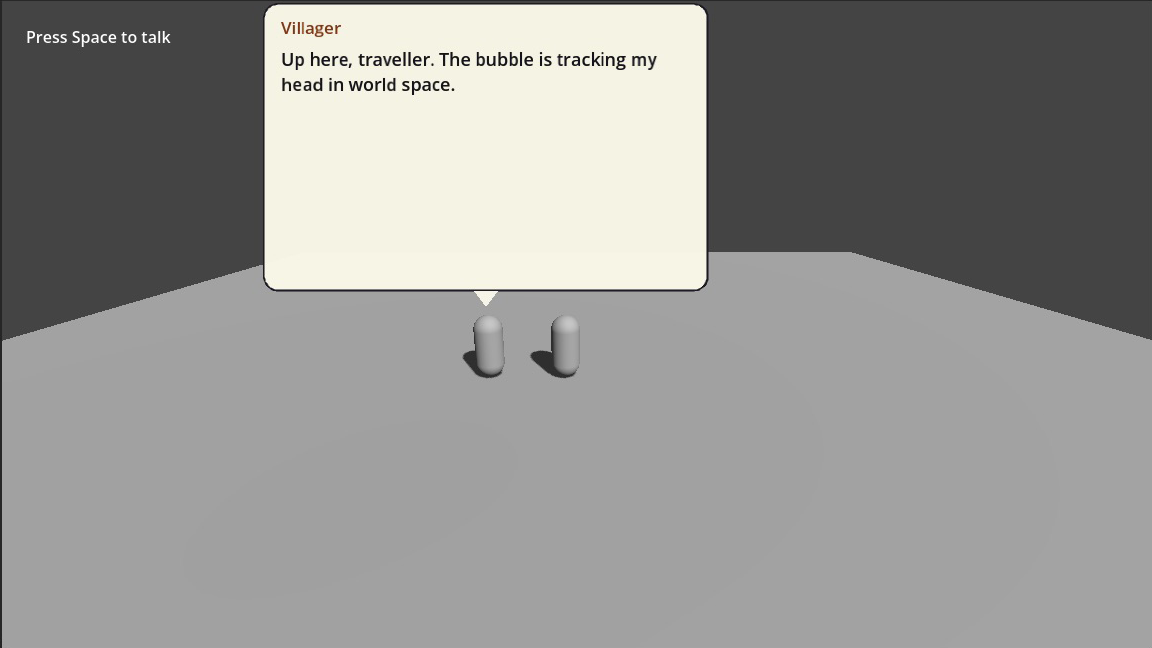
Vì sao vẫn nằm trên CanvasLayer
Hộp là UI, không phải hình khối. Gắn nó làm con của nhân vật sẽ khiến chữ phóng to thu nhỏ theo zoom camera, gần như luôn là thứ bạn không muốn.
Một điểm cố định, không có node nào
Cố ý không có chế độ "toạ độ thế giới" riêng. Đặt một Marker2D hoặc Marker3D ở chỗ tấm biển hay cái miếu, rồi bám theo nó.
Gõ toạ độ vào resource nghĩa là đoán xem (400, 300) nằm ở đâu. Kéo một marker trong viewport nghĩa là nhìn thấy nó — kết quả y hệt, đổi lại một node.
Thứ hoàn toàn khác
Kế thừa TalkAnchor và override resolve(). Mọi mode có sẵn đều đi qua đúng method đó, nên một socket xương hay một bộ cung cấp vị trí tuỳ ý cắm vào được mà không phải sửa addon.