Quick start
Three steps. Nothing to learn first.
1. Add the node
Enable NPC TalkKit in Project Settings → Plugins, then add an NPCTalkKit node as a child of an NPC you already have.
Your player controller, quests and saves are untouched. There is no autoload and no base class to inherit.
2. Type the lines
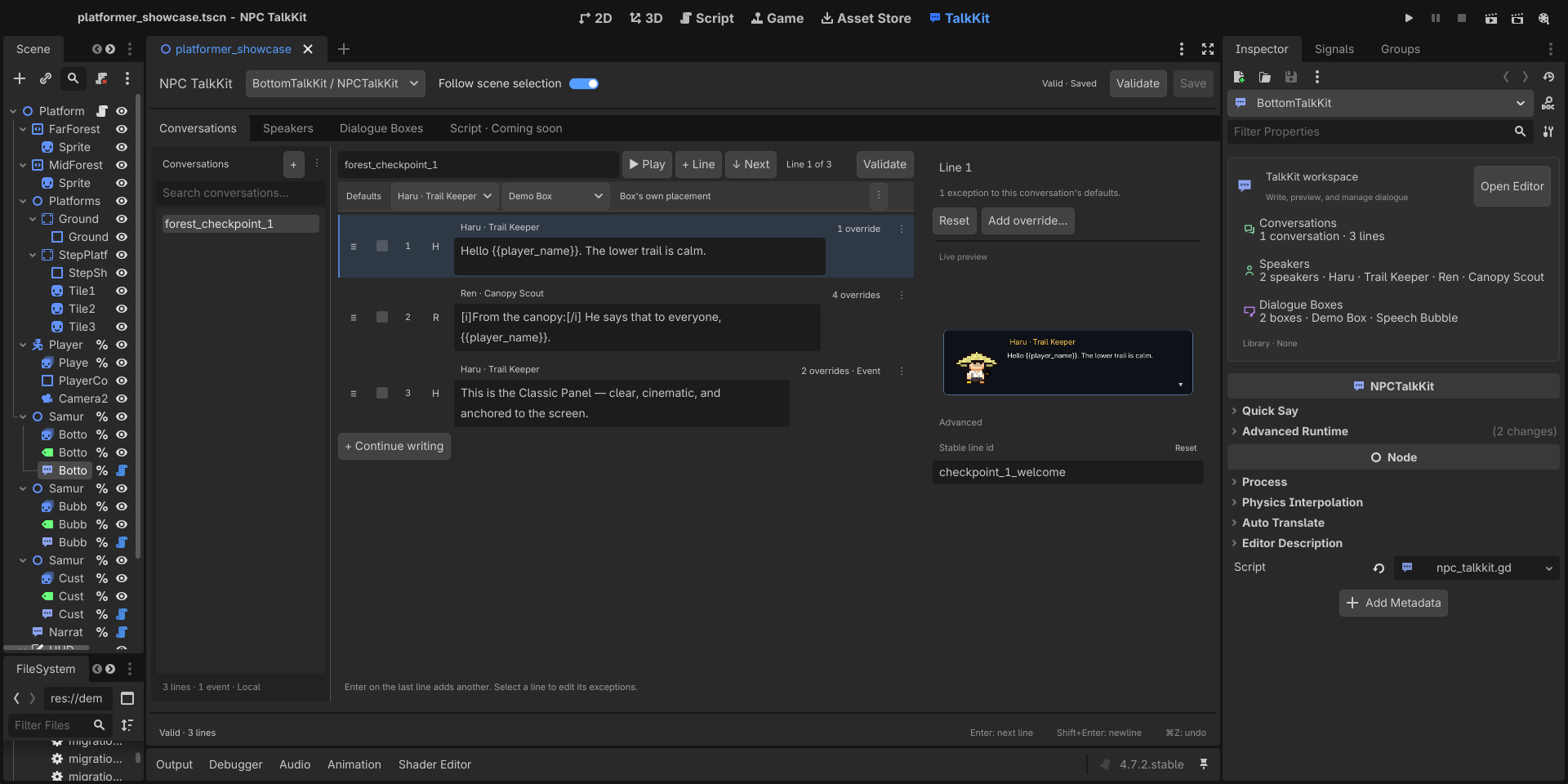
Select the node and press Open Editor in its compact Inspector summary, or open the TalkKit main screen at the top of Godot. In Conversations, press +, name the conversation greeting, and type. Enter moves to the next line; on the last line it creates another.
No files are created. The conversation lives in the scene, like an AnimationPlayer's animations.
3. Play it
extends Node

## Docs: /guide/quick-start — the whole surface needed to say two lines.

func _ready() -> void:
	_build_without_files()


#region play
# Nothing here needs a .tres file. The conversation was typed in the TalkKit
# workspace, and this is the entire runtime surface.
func greet() -> void:
	$NPCTalkKit.play(&"greeting")
#endregion


## Builds in code what the TalkKit workspace builds by hand, so this file runs.
func _build_without_files() -> void:
	var talk := NPCTalkKit.new()
	talk.name = "NPCTalkKit"
	var smith := TalkSpeaker.new()
	smith.display_name = "Torvald"
	talk.speakers = [smith]
	var box := _instant_box()
	talk.dialogue_boxes = [box]

	var conversation := TalkConversation.new()
	conversation.conversation_id = &"greeting"
	conversation.default_speaker = smith
	conversation.default_dialogue_box = box
	var first := TalkLine.new()
	first.text = "The forge runs hot today."
	var second := TalkLine.new()
	second.text = "Come back when you need steel."
	conversation.lines = [first, second]
	talk.conversations = [conversation]
	add_child(talk)


func _verify() -> Array[String]:
	var failures: Array[String] = []
	var spoken: Array[String] = []
	var talk: NPCTalkKit = $NPCTalkKit
	talk.line_started.connect(func(line: TalkLine) -> void: spoken.append(line.text))

	greet()
	if not talk.is_running():
		failures.append("quick_start: play() did not start the conversation")
	talk.advance()
	talk.advance()
	if spoken.size() != 2:
		failures.append("quick_start: expected two lines, got %s" % str(spoken))
	if talk.is_running():
		failures.append("quick_start: the conversation should have ended")
	return failures


## Typing speed lives on the dialogue box now, so turning it off for a scripted
## run means handing the node a box that types instantly.
func _instant_box() -> TalkBoxTemplate:
	var template := TalkBoxTemplate.new()
	template.typewriter_speed = 0.0
	return template
That is the whole runtime surface for an NPC that talks.
The three things TalkKit knows about
You can stop reading here and build something. This table is for when you want to change one of them — each is independent, so changing one never forces a change in another.
| Decides | Where it lives | |
|---|---|---|
| Conversation | what is said | the node, or a shared library |
| Dialogue Box | what the box is and how it looks | a template, shareable between NPCs |
| Placement | where it sits, what it tracks | a conversation default or line exception — screen or follow |
Script view: coming soon
The Script · Coming soon tab is a preview of a future text-first workflow. It is not an editable source format yet; the visual workspace and resources remain the source of truth.
A Classic Panel can follow an NPC's head. A Speech Bubble can pin to a screen corner. Picking a box does not pick a position.
What TalkKit does not do
It does not own quests, inventory, saves, player control, NPC AI, or branching logic. Your game already has those, and TalkKit is built to leave them alone.
For player choice, see Events and branching: playback pauses and your own GDScript decides what happens next.
Next
- Writing conversations — parameters, per-line options
- Dialogue box — templates, customizing, saving
- Events and branching — choices without a branching engine
- API reference — one page, everything public